|
[click to enlarge]
|
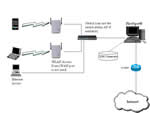
Scenario 1:
Simple Network Topology
In this scenario, all the WLAN APs and the client devices
will be in a single network segment. There will be no routers
between the client device and FirstSpot®.
Usage examples: an independent coffee shop, guest access
for corporation.
|
|

[click to enlarge]
|
Scenario 2:
Distributed Network Topology
There will be one FirstSpot® in each "site"
in this scenario. The account can roam among different sites
and several FirstSpot® can share the user account settings.
Starting from v6, FirstSpot® supports Distributed
Network Topologies with centralized ODBC datasource.
Usage examples: Chained stores / cafes in different hotspot
locations
|
|

[click to enlarge]
|
Scenario 3:
Centralized Network Topology
In this scenario, the traffic from different network segments
will go to FirstSpot® first before reaching the Internet.
The hotspot sites can be at different remote locations while
FirstSpot® is situated at a centralized location, if
the hotspot operators have control over the routing path
(e.g. ISP/WISP) or they set up VPN tunnel between the remote
hotspot sites and FirstSpot® (see here).
A set of presentation slides on implementing this scenario
using VPN is available here.
A slight modification to this scenario is to setup the
network so that FirstSpot® is bypass for return traffic
(FirstSpot® still needs to be in outgoing path of the
client). See here
for a diagram. Note that you need to turn off NAT within
FirstSpot® in this case.
Please note that you need to use the Advanced Edition to
take advantage of the Multiple Network Segments feature
(see our order page for details)
Usage examples: ISPs/WISPs
|
|
|
Load Balancing with Failover
FirstSpot® Loading Balancing with Failover is an active/active
architecture. Both FirstSpots will be active and serving
clients at the same time. If one of the FirstSpot fails,
the other FirstSpot will assume all workload automatically.
Usage examples: mission critical deployment, site with
heavy traffic
|
|
